


Protective Cases


Backpacks
Systems
Displays & Projectors
Printers & Scanners
Storage & Memory
Networking
Components & Accessories
View all

A mic that bends to the student, not the other way around.
TP-H18-CBV
The TechProtectus TP-H18-CBV is a wired USB-C over-ear student headset with a noise-reducing unidirectional boom mic, a 5-foot braided chew-proof cord and a headband TechProtectus rates for drops up to 10 feet. It's built for k12 classrooms as an alternative to the Logitech H390.
TechProtectus sent us two samples this fall, this boom-mic model and a sibling with a built-in nub mic, and asked us to put them up against the H390. So we did. Here's where each one wins.
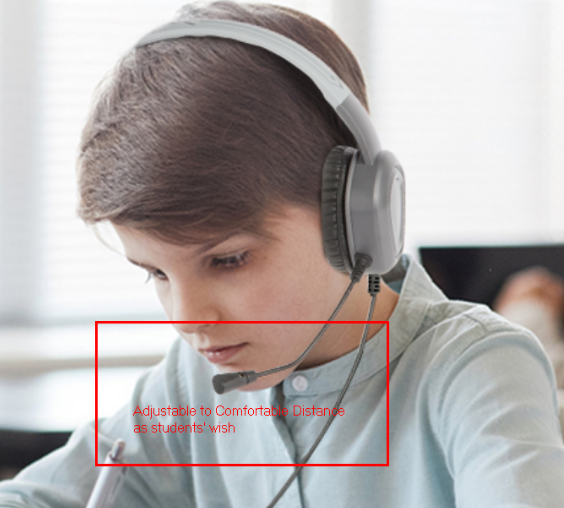
The difference that matters is the microphone arm. The Logitech H390 has a rigid boom that only swivels up and down on one hinge. The TP-H18-CBV has a flexible boom that bends to each student's mouth, and TechProtectus says that once it's adjusted, "it stays securely in place." The H390 is an office headset. The TP-H18-CBV is a student headset.
That's not a knock on Logitech. Logitech sells the H390 for calls and webinars, and for an adult at a desk it's a good headset: 197 g, on-ear, a 1.9 m cable, inline volume and mute, and a 2-year limited hardware warranty. It comes in USB-A (981-000406) and USB-C (981-001576).
The trouble starts when a 9-year-old puts it on.
Speech-to-text, oral reading fluency checks and language-learning apps all grade what the microphone hears. A rigid swivel puts the mic wherever the hinge puts it, and on a smaller face that's often out by the cheek. A flexible boom gets pulled to the corner of the mouth, so the software hears the student instead of the room.
The TP-H18-CBV's mic is unidirectional, meaning it picks up mostly from the front. In a testing lab with 30 students talking at once, that pickup pattern is the spec that matters most.
TechProtectus pitches this model specifically for "language learning, speech-to-text, and online assessments." I'd add ENL/ESOL pull-out rooms to that list. Those are the rooms where a misheard word turns into a wrong score.
Some will. Any exposed mic arm is the first thing a bored student bends, twists or pulls on. A flexible boom handles being repositioned better than a rigid swivel, because bending it is what it's designed for. It doesn't make the arm student-proof.
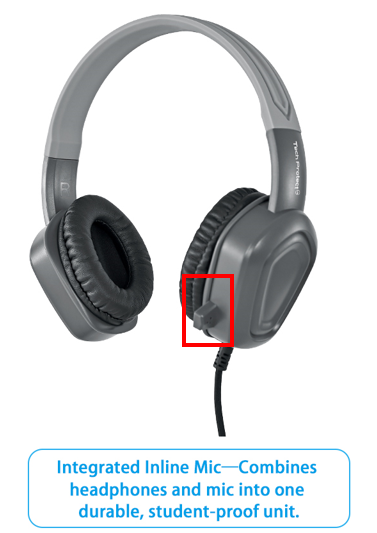
That's why TechProtectus makes a second version with no arm at all. The integrated nub mic sits right on the ear cup. Nothing sticks out, so there's nothing to snap off and nothing to play with during a lesson.
The cord is the other weak spot on any classroom headset. On the H390, the common failure points are the cable strain relief and the inline control pod, according to iFixit's repair notes. TechProtectus uses a 4mm braided cord and lets you order without the inline volume control. That's one less module hanging off the cable for a student to yank on.
Order the TP-H18-CBV if your devices have USB-C. The "C" model is the USB-C version, and USB versions have a built-in sound card, so they're plug and play with no software. TechProtectus builds the same headset in USB-A and 3.5mm TRS too, with or without an inline volume control.
That's one option the H390 doesn't have. Logitech makes the H390 in USB-A and USB-C only, with no 3.5mm version. If your district has a mix of older USB-A desktops and newer USB-C Chromebooks, you can standardize on one headset model and just pick the plug per building.
My take on volume control: leave it off for younger grades. Volume gets set on the device, and there's nothing on the cord to fiddle with. For middle and high school, the inline control is worth having.

Grades 4–12 with a lot of voice work: buy the TP-H18-CBV. The flexible boom is the right call when the mic is doing graded work.
K–3, or carts where headsets get dumped in a bin: skip the boom. Get the TechProtectus nub-mic version. Fewer exposed parts means fewer replacements, and that's taxpayer money you're not spending twice.
Teachers and front-office staff: honestly, the Logitech H390 is fine. Adults don't chew cables, and inline mute is handy on calls. Its 2-year warranty is a real point in its favor, so check the TP-H18-CBV term before you compare price per headset.
You can see the rest of the line on our student headphones page, including the lower-cost TP-H23 wired headset. We also compared the earlier TP-H16 against the Thinkwrite TW200 Duro, and you can read how other districts use TechProtectus in our TechProtectus case study.
Is the TechProtectus TP-H18-CBV a good Logitech H390 alternative for schools?For students, yes. The Logitech H390 is an office headset with a rigid swivel mic and an inline control pod. The TP-H18-CBV is built for k12 use, with a flexible boom mic, a 5-foot braided chew-proof cord and a 10-foot drop rating from TechProtectus. For staff who want inline mute and a 2-year warranty, the H390 is still a fine pick.
Does the TP-H18-CBV work with Chromebooks?It works on any Chromebook with a USB-C port, with no software to install. If you still have USB-A-only devices in service, TechProtectus builds the same headset with a USB-A plug or a 3.5mm jack, so you can match the plug to each building's devices without switching headset models.
Will students break the boom mic?Some will, eventually. Any exposed mic arm is the first part a student bends or pulls. The flexible boom tolerates repositioning better than a rigid swivel, but if you're buying for K–3, look at the TechProtectus version with the integrated nub mic instead. It has no arm at all.
What's the warranty on the TP-H18-CBV compared to the Logitech H390?Short answer: confirm it before you compare. We're getting the TP-H18-CBV warranty term from TechProtectus now. Logitech covers the H390 with a 2-year limited hardware warranty, which is longer than many student headsets carry.
Can we clean the headsets between classes?Yes. The TP-H18-CBV has protein leather earpads over memory foam, and TechProtectus designed them to wipe clean. That matters on shared carts and in media centers, where one headset can sit on six or seven different students in a single day.
Can we get a demo unit before ordering?Ask us. We have TechProtectus samples of both the boom-mic and nub-mic versions here in Jacksonville Beach. Email sales@9to5computer.com with your school and how many classrooms you're outfitting, and we'll set up a pilot so a teacher can try them with students first.
If you're torn between the boom and the nub, send one of each to your toughest classroom for a week. The headsets will tell you.
Contact sales@9to5computer.com for a quote or demo unit today!
Contact us to get the best pricing in the industry.


